
Hotels.com: Book Hotel Deals
Hotels.com LPTravel & Local
4.874.13K Reviews
- Version
- 2026.45.0
- Installs
- 50.00M
- Age Rating
- Everyone
Screenshots




Our Review of Hotels.com: Book Hotel Deals
 Analysis by Appyee
I started using Hotels.com: Travel Booking because I wanted a practical way to organize hotel searches when more than one person was involved. It is easy to think of a booking app as a private tool for one traveler, but in real life a trip often belongs to a household: one person checks dates, another compares neighborhoods, and someone else needs the confirmation details later. My experience with this app is strongest in that shared planning space. It keeps the search process focused on places to stay, while still giving each person enough information to make a useful decision.
Developed by Hotels.com LP, this free Travel & Local app is available for everyone and supports devices running at least iOS or Android version 10. It has been around since Apr 13, 2011, and the current version is 2026.34.0. Its scale is also reassuring: it has passed 50 million installs, with an average rating of 4.8 from around 1 million ratings and roughly 74 thousand reviews. Those figures do not replace personal testing, but they do suggest that the app has become a familiar choice for people who want to search and reserve accommodation from a phone.
How Hotels.com works when a household shares the planning
The most realistic scenario for me is a short family trip where the person making the reservation is not the only person who needs to understand it. Imagine planning a weekend away: I search for hotels while another household member checks whether the area is convenient, and a teenager wants to know whether the room will be comfortable enough. The app is useful here because the search can be treated as a conversation rather than a solitary transaction. I can show the property information, discuss the location, and pause before committing instead of trying to remember every detail from a quick conversation.
That shared-device situation also reveals an important boundary. The app is not a substitute for separate identities or careful account habits. If several people use the same phone, the person holding it may see the current search, saved details, or booking information. I would therefore avoid handing the device around casually after entering personal or reservation details. A shared household can use the app successfully, but it should decide in advance who is responsible for the final booking and who is only helping with research.
I found it helpful to separate the process into three stages: exploring, checking, and confirming. During exploring, everyone can suggest destinations and dates. During checking, one person should verify the room type, location, cancellation wording, and total cost shown at the final step. During confirming, the account holder should take responsibility for the reservation details. This simple workflow prevents the common mistake of treating a group discussion as if everyone has equal control over the booking.
The app is best used as a shared research window, not as a shared account by default. That distinction matters in a household. Someone may only want to compare hotels, while another person may be the traveler whose name and contact details are attached to the reservation. Keeping those roles clear makes the experience calmer and reduces the chance of an accidental change or a forgotten confirmation.
What the search experience is good at
The central strength is focus. Hotels.com is designed around finding accommodation and travel deals, including last-minute options, rather than trying to become a complete travel diary or social planning platform. When I already know the destination and mainly need somewhere to sleep, that narrow purpose saves time. I can concentrate on comparing properties instead of moving through unrelated travel content.
For a household, the useful comparison is not simply “Which hotel looks nicest?” I would ask four practical questions: Is the location workable for everyone? Does the room arrangement fit the group? Is the price acceptable after all required charges are shown? And who will deal with the reservation if plans change? The app helps with the first two stages of that conversation, but the final responsibility still belongs to the person booking.
Last-minute searching is another area where it can make sense. If a planned stay changes suddenly, opening a dedicated hotel app is more direct than searching the wider web and sorting through unrelated results. I would still compare the final terms carefully, especially when a household is tired or traveling already. A fast booking is useful only if everyone understands what has been selected.
One less obvious advantage is that the app can reduce memory-based planning. Instead of telling another person, “I think this hotel had the larger room,” I can return to the property information and check the details again. That is particularly helpful when two people are making decisions at different times. The app becomes a reference point for the discussion, although I would still keep the confirmation accessible to the person who actually needs it during the trip.
Setting boundaries before anyone taps the final button
Shared use works better when the household agrees on a few rules before searching. I would decide whose account is being used, who is allowed to enter traveler information, and who must approve the final reservation. This is not a feature claim about the app; it is a sensible way to use any booking service when a phone passes between adults, children, or guests.
Age context matters too. The app carries an Everyone content rating, which makes it suitable as a general travel reference in a household. That does not mean every person should independently complete a reservation. A younger user may be perfectly capable of comparing destinations or reading hotel descriptions, while an adult should handle payment, identity details, and the final review of terms. I like this division because it lets children participate without giving them responsibility they may not understand.
For teenagers, I would use the app as a guided planning tool. Ask them to shortlist properties based on location and room arrangement, then have an adult check the booking conditions. This turns the search into a useful lesson in travel planning: a low-looking price is not the only consideration, and a convenient neighborhood can matter more than a decorative photo. The app supports that conversation because the accommodation itself stays at the center.
For a shared tablet or family phone, I would also make a habit of closing the booking screen when the discussion is over. If the device is passed to someone else, they should not be expected to know whether a search is still active or whether details on screen are private. The safest approach is simple: the person responsible for the reservation reviews the information alone before confirming.
Another practical boundary is separating inspiration from commitment. I may allow everyone to browse freely, but I would not let several people change dates or room choices at the same time. A single “editor” avoids confusion. Others can give feedback, and the editor can repeat the final selection aloud before completing it. This sounds basic, but it prevents a surprising amount of household friction.
Coordinating dates, rooms, and expectations
Hotel planning often fails because people agree on the destination but not on what the stay needs to provide. I recommend starting with the group’s non-negotiables before opening the app. For example, one person may need a particular sleeping arrangement, another may care about being near transport, and someone else may be focused on keeping the total within a limit. Once those priorities are clear, the search becomes a comparison rather than an argument over attractive photos.
I found that the most useful household conversation happens around trade-offs. A property closer to the center may simplify daily travel but cost more. A cheaper option may require more coordination once everyone is on the ground. A last-minute deal may look appealing, but the group should be comfortable with the stated booking conditions before choosing it. Hotels.com can help locate the options; it cannot decide which compromise suits the household.
When several people are involved, I would read the final room description together instead of relying on a single image. The person who cares about sleeping arrangements should have a chance to confirm that the selected option is actually suitable. This is one of my strongest practical tips because a booking can be technically correct while still failing the group’s real needs.
Coordination also includes what happens after the booking. The account holder should make sure the traveler knows the property name, dates, and any information needed at arrival. If the person who booked will not be present, the household should agree on how the confirmation will be shared. I would not assume that everyone can retrieve it simply because the app is installed on a common device.
For a couple, this process may be quick: one person searches, the other approves. For a larger household, I would nominate one decision-maker and one checker. The decision-maker handles the app, while the checker verifies the dates, room, and destination before confirmation. This two-person method is more reliable than letting everyone make small changes, particularly when the trip is being arranged late at night or during a busy day.
Account privacy and trust on a common device
The app’s usefulness in a household depends heavily on trust. A family may be comfortable sharing a tablet, but that does not mean every account detail should be visible to every user. I would treat a booking account like email or a banking app: helpful to access when needed, but not something to leave open without thought.
This is especially important when different adults travel at different times. One person may be organizing a personal work trip while another is planning a family stay. In that situation, a shared device can blur boundaries quickly. I would use separate device profiles or separate personal devices where possible, and I would avoid assuming that a household’s general trust removes the need for privacy.
The age rating makes the app approachable for ordinary family use, but it should not be confused with independent purchasing permission. A child can help evaluate whether a hotel looks suitable, yet an adult should confirm who is traveling, whether the dates are correct, and whether the reservation can be changed. This is a healthy balance between participation and supervision.
I also appreciate that a booking app can give a household a common point of reference, but that benefit has a limit. If people disagree about the destination, the app cannot resolve the disagreement. If a traveler has accessibility, medical, or sleeping requirements, those needs should be discussed directly and checked carefully before booking. I would never let a polished listing replace a conversation about what someone actually needs.
Trust also means being honest about who will pay and who will manage changes. The person browsing may not be the person whose payment method is used, and the person traveling may not be the person who can access the account. Agreeing on those roles before confirmation is more important than saving a few minutes during the search.
Where it beats ordinary web searching, and where it does not
Compared with a general search engine, Hotels.com gives me a more focused route to accommodation. I do not have to begin with broad travel pages and then filter out attractions, articles, and unrelated results. That is valuable when the household already knows it needs a hotel and wants to move directly into comparison.
Compared with contacting hotels one by one, the app is more convenient for early research. I can consider multiple properties in one place and bring the shortlist back to the household. Direct contact can still be better when the group has an unusual request, needs a detailed answer about a specific situation, or wants to discuss something that a standard listing cannot explain clearly. I would use the app to narrow the choices, then seek direct clarification when the decision depends on a special requirement.
Compared with a broad travel platform, the focused approach may feel less useful if I am trying to coordinate flights, activities, transport, and accommodation as one complete itinerary. In that case, a wider travel service may be more convenient. Hotels.com is the better fit when the hotel is the main problem to solve, especially for a short stay or a sudden booking.
There is also a trade-off between speed and careful reading. A dedicated app makes it easy to move from search to reservation, but that convenience can encourage rushed decisions. I recommend slowing down at the final stage, particularly for a shared household booking. Check the dates, room arrangement, traveler information, and terms while everyone who matters is still present.
Who should use it and who may prefer another method
I would recommend Hotels.com to solo travelers, couples, and households that want a straightforward hotel search without building a complete travel itinerary inside one service. It is especially practical when one person coordinates the reservation but several people need to discuss the choice. The free price also makes it easy to try without treating the app as a major commitment.
It is a good match for a household that values a clear division of responsibility. One person can research, another can review, and an adult can confirm. The app’s broad availability and Everyone rating make it comfortable as a shared reference tool, provided the account and payment boundaries remain clear.
I would be more cautious about recommending it as the only tool for a complicated group trip. If the trip involves several properties, unusual accommodation needs, or many connected travel arrangements, a broad itinerary service or direct communication with the properties may be more suitable. The app can still help with hotel research, but it should not be forced to manage every part of a complex plan.
I would also skip relying on it alone when the main concern is a highly specific request that must be confirmed personally. Listings are useful for narrowing choices, but they are not a replacement for asking precise questions when the comfort or safety of a traveler depends on the answer.
My household verdict after using it
My overall impression is positive because Hotels.com: Travel Booking does one important job well: it gives a household a practical place to compare accommodation and move toward a reservation. Its strongest quality is not just convenience; it is the way a focused hotel search can make a shared decision easier to discuss. I can imagine using it for a weekend away, a last-minute overnight stop, or the first stage of a larger trip.
The main limitation is not a missing button or a complicated screen. It is the responsibility that comes with shared access. The app does not remove the need to decide who controls the account, who checks the terms, who pays, and who keeps the confirmation. Families and housemates that establish those boundaries will get much more from it than groups that pass the phone around without a plan.
For me, the best workflow is simple: browse together, shortlist a few properties, let one person verify the practical details, and have an adult complete the reservation. That approach respects different ages and levels of responsibility without excluding anyone from the conversation. It also makes the app feel less like a rushed purchasing tool and more like a useful part of household travel planning.
Considering its long presence in the category, its current 2026.34.0 release, and the strong response from its large user base, I see it as a dependable option for hotel-focused searches. I would choose it when accommodation is the central task and the group wants a direct, mobile-first way to compare possibilities. I would look elsewhere when I need a complete trip organizer or highly personalized arrangements. Used with sensible account boundaries, it is an app I would recommend to a friend who wants to find a place to stay without making the household planning process harder than it needs to be.
Privacy and Permissions
See what permissions an app requests and how it handles your data.
- Identity
- find accounts on the device, add or remove accounts
- Calendar
- read calendar events plus confidential information, add or modify calendar events and send email to guests without owners' knowledge
- Contacts
- find accounts on the device
- Location
- approximate location (network-based), precise location (GPS and network-based)
- Phone
- read phone status and identity
- Photos/Media/Files
- read the contents of your USB storage, modify or delete the contents of your USB storage
- Storage
- read the contents of your USB storage, modify or delete the contents of your USB storage
- Camera
- take pictures and videos
- Wi-Fi connection information
- view Wi-Fi connections
- Device ID & call information
- read phone status and identity
- Other
- view network connections, create accounts and set passwords, connect and disconnect from Wi-Fi, expand/collapse status bar, full network access, read sync settings, run at startup, use accounts on the device, prevent device from sleeping, toggle sync on and off, read Google service configuration
Verdict
Strengths of Hotels.com: Book Hotel Deals
- Rewards nights can lower the cost of future hotel stays.
- Large selection of properties across many destinations.
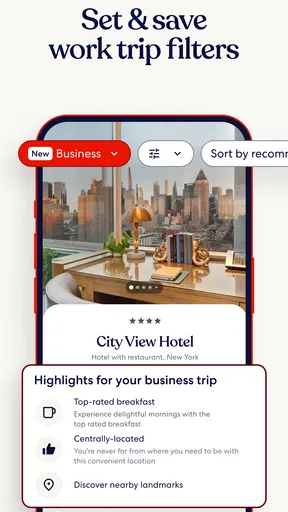
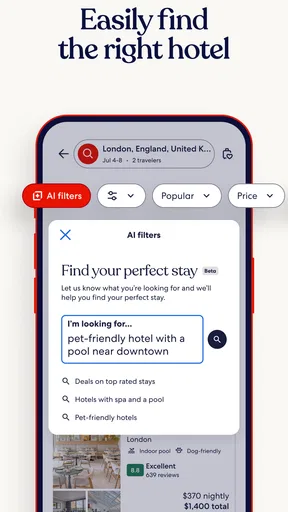
- Useful filters make it easy to compare hotels by price and amenities.
- Guest reviews and photos help set realistic expectations.
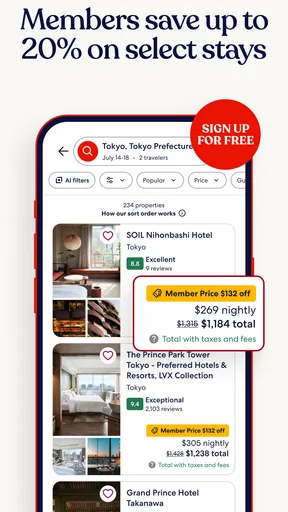
- Mobile-exclusive deals may offer extra savings on selected bookings.
Limitations of Hotels.com: Book Hotel Deals
- Some reservations have strict cancellation rules or nonrefundable rates.
- Prices may change after taxes, fees, and currency conversion are added.
- Customer support quality can vary when resolving booking problems.
- Reward benefits may differ depending on the property and booking terms.
- Popular hotels and dates can sell out quickly during peak travel periods.
Similar Picks in This Category
View All
Google Maps
Google LLC3.4

Google Maps Go
Google LLC4.1

Booking.com: Hotels & Travel
Booking.com Hotels & Vacation Rentals4.8

Google Earth
Google LLC3.8

Skyscanner Flights Hotels Cars
Skyscanner Ltd4.8

trivago: Compare hotel prices
trivago N.V.4.4
Frequently Asked Questions
What can I do with the Hotels.com: Travel Booking app?
Hotels.com: Travel Booking lets you search and reserve hotels, apartments, resorts, vacation homes, and other accommodations from your Android or iOS device. You can compare prices, browse photos and guest reviews, check available amenities, view locations on a map, and manage upcoming reservations. The app is especially useful when you want to organize accommodation details and booking information in one place while traveling.
Is it safe to book accommodation through Hotels.com?
Hotels.com is a well-known travel booking service, and the app uses standard account and payment security measures to process reservations. However, the quality of an individual stay depends on the property, so it is important to read recent guest reviews, check cancellation conditions, confirm the total price, and review the property’s contact and check-in information before paying. Always keep your confirmation details accessible.
Does Hotels.com offer free cancellation or refunds?
Cancellation and refund policies are determined by the individual accommodation and the rate selected during booking. Some rooms allow free cancellation until a specific deadline, while discounted or prepaid rates may be non-refundable or involve fees. Before confirming a reservation, carefully read the cancellation terms shown in the app. If plans change, use the booking management section as soon as possible.
Are the prices shown in the Hotels.com app the final prices?
The app generally displays the accommodation rate and provides a price breakdown before you complete the reservation, but the final amount can vary depending on taxes, service charges, resort fees, local regulations, currency conversion, and payment timing. Some properties also collect additional deposits or charges at the hotel. Review every line of the total and the payment conditions before booking.
Can I manage my reservation and contact the hotel from the app?
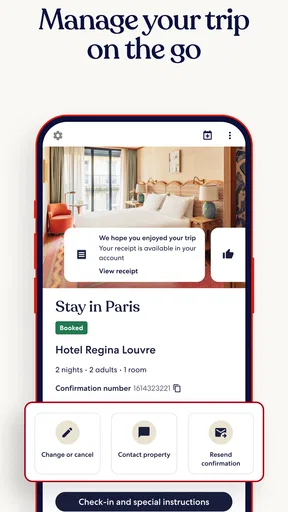
After booking, you can usually access your confirmation, stay dates, property address, check-in instructions, cancellation rules, and other reservation details through the app. Depending on the property and booking type, Hotels.com may also provide options to contact customer support or communicate with the accommodation. It is still wise to save the confirmation number and verify special requests directly with the hotel.
